Connect WordPress Post Types with ACF Relationship Fields
Model links between custom post types with ACF Relationship or Post Object fields, render references safely, and query related content.
 Tayyab Rehman
An ACF Relationship field stores references from one WordPress post to selected posts of another type; it does not merge the post types or automatically create a two-way link. A practical model is a case_study post that selects one or more service posts. The case study owns the reference, and its template uses those references to render related services.
This pattern is useful when an editor needs to choose related content from the admin instead of matching records by title or slug. Before adding fields, decide which side owns the relationship, whether one or many items are allowed, whether the reverse direction is needed, and what should happen if a referenced post is unpublished or deleted.
Should you use a Relationship field or a Post Object field?
Both fields let an editor select posts. A Post Object field is often clearer for one referenced item; the Relationship field is suited to choosing and ordering multiple results. In the field settings, restrict the selectable post types and, where supported, limit results by taxonomy or other criteria. Configure a minimum and maximum selection when the content model requires one.
For example, create an ACF field group called Case Study Details, attach it to the case_study post type, then add a Relationship field:
| Setting | Example | Why it matters |
|---|---|---|
| Field label | Related services | Clear editor-facing label |
| Field name | related_services | Stable programmatic name and meta key |
| Field type | Relationship | Select and order multiple posts |
| Post type filter | service | Prevent unrelated content selections |
| Return format | Post Object | Convenient template data |
| Maximum selections | 3 | Keeps the section focused |
The return format is important. ACF can return post objects or IDs, depending on the field type and configuration. Write the template for the format you selected; do not assume an integer when the code expects a WP_Post.
How do you render the selected posts?
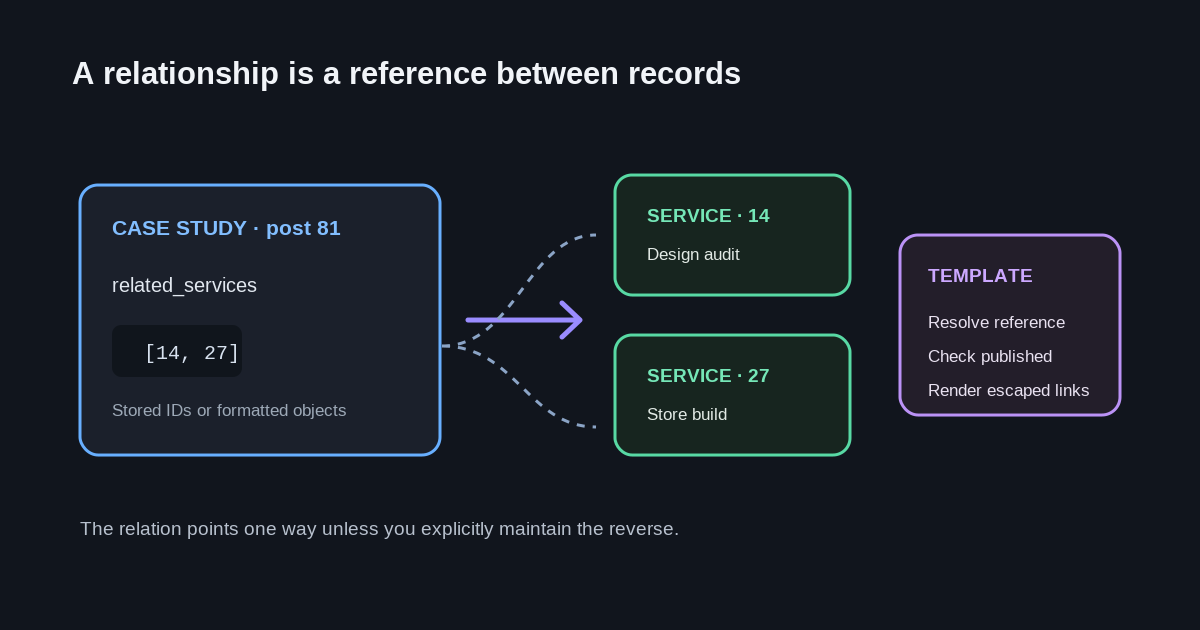
With the Relationship field set to return Post Objects, the current case study can render its selected services like this:
<?php
$services = get_field( 'related_services', get_the_ID() );

if ( is_array( $services ) && $services ) :
    ?>
    <section aria-labelledby="related-services-title">
        <h2 id="related-services-title">Related services</h2>
        <ul>
            <?php foreach ( $services as $service ) : ?>
                <?php
                if ( ! $service instanceof WP_Post || 'publish' !== $service->post_status ) {
                    continue;
                }
                ?>
                <li>
                    <a href="<?php echo esc_url( get_permalink( $service ) ); ?>">
                        <?php echo esc_html( get_the_title( $service ) ); ?>
                    </a>
                </li>
            <?php endforeach; ?>
        </ul>
    </section>
<?php endif; ?>
The status check makes the template's behavior explicit if an editor selects a draft and the field configuration permits it. The URL and title are escaped for their output contexts. For a more detailed card, use that post's thumbnail and excerpt, and escape the URL, alt text, and text separately. Do not print field content as raw HTML unless its allowed markup is intentionally sanitized.
If the field returns IDs instead, normalize and validate them before fetching posts:
$related_ids = get_field( 'related_services', get_the_ID() );
$related_ids = array_filter( array_map( 'absint', (array) $related_ids ) );

foreach ( $related_ids as $service_id ) {
    $service = get_post( $service_id );
    if ( ! $service instanceof WP_Post || 'service' !== $service->post_type ) {
        continue;
    }

    // Render the verified service using escaped output.
}
This format makes the expected relationship explicit and prevents a malformed or stale value from being treated as the intended post type. get_field() formats ACF values according to the field settings; the lower-level get_post_meta() function returns stored metadata and may not have the same shape.
How do you find posts that refer to the current post?
A selected relationship is directional: case studies store IDs for services, but a service does not necessarily store the case studies that selected it. If a service page needs to list referring case studies, choose a deliberate strategy:
- Query the relationship field's stored values, understanding how ACF stores that field type.
- Maintain a second relationship field when both sides need editor-managed selection.
- Use a supported bidirectional relationship feature only after checking your installed ACF version and configuring which field is updated.
- For a large catalog or frequent reverse queries, use a purpose-built index or relationship table rather than an expensive broad metadata scan.
For an ACF Relationship field stored as a serialized array of IDs, a meta query can search for an exact ID token. Confirm the actual stored value on a staging post before relying on this:
$service_id = get_the_ID();
$needle = '"' . absint( $service_id ) . '"';

$case_studies = new WP_Query(
    array(
        'post_type'      => 'case_study',
        'post_status'    => 'publish',
        'posts_per_page' => 12,
        'meta_query'     => array(
            array(
                'key'     => 'related_services',
                'value'   => $needle,
                'compare' => 'LIKE',
            ),
        ),
    )
);
The quotes around the numeric value avoid matching an ID such as 42 inside 142. Still, serialized metadata queries can be less efficient than a normalized relationship table as the dataset grows. A meta query also reflects only the field's current storage format, so retest after changing the field type, field name, or return configuration.
What is a field name, and what is a field key?
The field name is the programmer-facing name, such as related_services; it is also commonly the visible post-meta key. The field key is an ACF identifier such as field_64f123abc. ACF uses field definitions to format and save values; hidden reference metadata can connect a saved value to its field definition. Do not expose a field key as though it were the selected service ID, and do not rename a field without auditing templates, queries, imports, and existing metadata.
If you change a field name after content exists, older metadata may remain under the old key. Plan a migration and verify representative records instead of expecting ACF to rewrite every value automatically. The separate guide to ACF field values and WordPress post meta explains the stored values and reference keys in more detail.
How should you handle deleted, draft, or private references?
Decide what the frontend should show if the selected post stops being public. A query that loads drafts or private content can expose information unintentionally. For public pages, require published related posts and render a clean empty state when there are none. Editors should also know whether the relationship field permits private records.
The relationship is not a substitute for access control. If the linked record contains private material, check permissions on the server before rendering it or exposing it through the REST API. Do not assume that hiding the link in a template protects the target URL.
When migrating a site, export IDs and map old IDs to the new content records; a post ID from staging will not necessarily refer to the same record in production. After import, inspect sample records and verify the actual related titles and links.
Should you store the relationship on one side or both?
Store the minimum data needed to render the experience. If a case study page shows selected services, one field on the case study can be enough. If service pages also need a list of case studies, decide how that reverse list remains accurate. Querying every case study on each request may be acceptable for a small site, but it can become costly as records grow. A second editable field creates two sources that editors can disagree about; an automated bidirectional update needs its own rules for deletion, ordering, and conflicts.
Do not use titles as relationship identifiers. Titles can change, repeat, or be translated, while a WordPress post ID identifies a record within one database. IDs still change across independent environments, so an import must map old records to their new IDs. For a repeatable migration, preserve a stable external ID or slug and create an explicit mapping table during import rather than assuming development and production IDs match.
Decide what the editor sees when the related item is deleted or no longer published. Usually the public page should omit it, while the editor should be able to repair the relationship. If a linked record is private, verify authorization at the endpoint as well as in the theme; removing a card from the page does not protect the post's URL or API response.
A reliable relationship-field workflow
- Define the content relationship and choose its owner.
- Configure one field with specific post-type filters and clear limits.
- Pick a return format and write code for exactly that format.
- Escape output and ignore references that are no longer public.
- Test empty, single, multiple, draft, deleted, and migrated references.
- Add a reverse query only if the page needs it; measure large queries.
ACF documents the Relationship field, Post Object field, and retrieving field values. WordPress documents post metadata and WP_Query. For the custom post type itself, see the register_post_type reference.