Create a Custom WordPress Menu Walker Without Breaking Navigation
Learn when to extend Walker_Nav_Menu, register a theme menu, customize item markup safely, and test nested navigation.
 Tayyab Rehman
A custom Walker_Nav_Menu changes how WordPress traverses and outputs menu items; use one when you genuinely need different HTML structure, not just a CSS class. WordPress already provides menu registration, labels, current-item state, URL handling, and several filters. Preserve those conventions when extending the walker so custom markup does not discard accessible navigation behavior or introduce unsafe output.
This example targets a classic PHP theme and adds a predictable submenu class while retaining WordPress's menu editing interface. The core walker API can evolve, so check the WordPress version your project supports before overriding methods.
Do you need a Walker class?
If the requirement is only to add a class to a link or item, use a core menu filter such as nav_menu_link_attributes or nav_menu_css_class. A walker is appropriate when you need to change the list structure, add nested wrappers, or consistently control how items are emitted. Keeping the default markup usually means fewer compatibility issues with plugins and themes.
In a theme's functions.php or a site-specific plugin, register a location:
add_action(
    'after_setup_theme',
    function () {
        register_nav_menus(
            array(
                'primary' => __( 'Primary navigation', 'theme-textdomain' ),
            )
        );
    }
);
Once registered, an editor can assign a menu to that location in the WordPress admin. If the location has no menu, decide whether the theme should show no navigation or use a deliberate fallback; do not accidentally expose every page in an uncontrolled menu.
What does a Walker do?
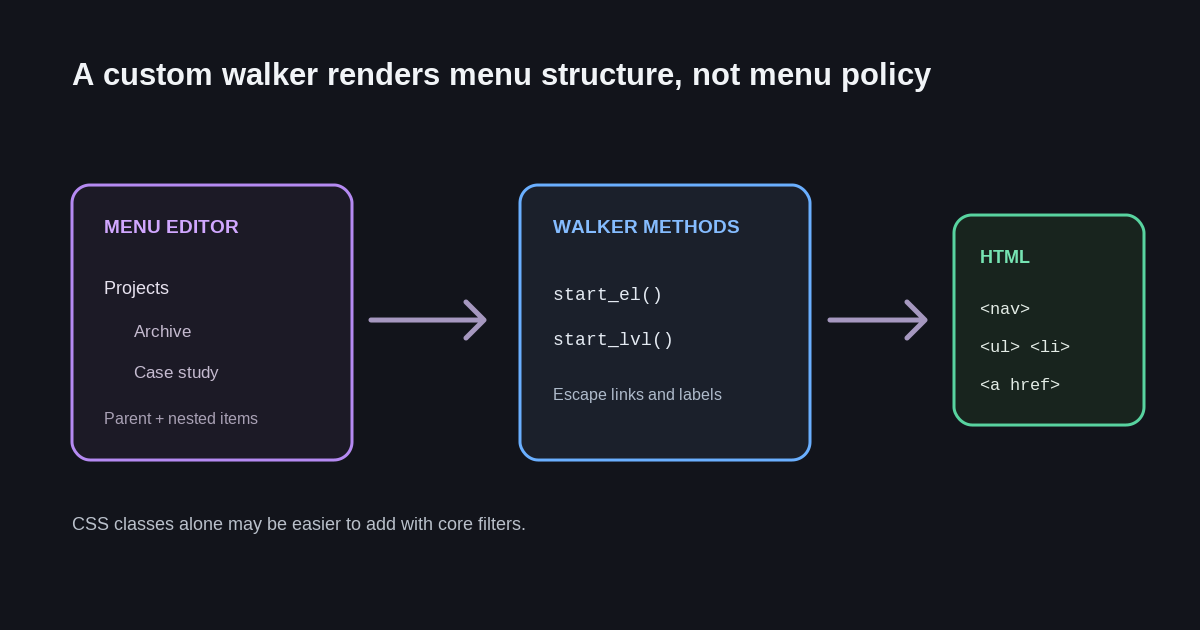
WordPress's walker visits each menu item and calls methods to generate the list level, item, and closing tags. start_el() outputs one item, while start_lvl() opens a nested list for children. Menu depth is passed to these methods. A custom walker should remain a renderer: keep data modeling, access rules, and complicated business logic elsewhere.
How do you make a minimal custom walker?
The example below keeps core menu filters for item classes and link attributes, escapes every attribute for its output context, and adds a class to nested lists. Put this class in a theme file that is loaded once:
<?php
class Site_Menu_Walker extends Walker_Nav_Menu {
    public function start_lvl( &$output, $depth = 0, $args = null ) {
        $indent = str_repeat( "\t", $depth );
        $classes = apply_filters(
            'nav_menu_submenu_css_class',
            array( 'sub-menu', 'site-submenu' ),
            $args,
            $depth
        );
        $class_names = implode( ' ', array_map( 'sanitize_html_class', $classes ) );

        $output .= "\n{$indent}<ul class=\"" . esc_attr( $class_names ) . "\">\n";
    }

    public function start_el(
        &$output,
        $data_object,
        $depth = 0,
        $args = null,
        $current_object_id = 0
    ) {
        $item = $data_object;
        $indent = str_repeat( "\t", $depth );
        $classes = empty( $item->classes ) ? array() : (array) $item->classes;
        $classes[] = 'menu-item-' . absint( $item->ID );
        $classes = apply_filters( 'nav_menu_css_class', array_filter( $classes ), $item, $args, $depth );
        $class_names = implode( ' ', array_map( 'sanitize_html_class', $classes ) );

        $output .= $indent . '<li class="' . esc_attr( $class_names ) . '">';

        $attributes = array(
            'href' => ! empty( $item->url ) ? $item->url : '',
        );
        if ( ! empty( $item->attr_title ) ) {
            $attributes['title'] = $item->attr_title;
        }
        if ( ! empty( $item->target ) ) {
            $attributes['target'] = $item->target;
        }
        if ( ! empty( $item->xfn ) ) {
            $attributes['rel'] = $item->xfn;
        }
        if ( '_blank' === ( $attributes['target'] ?? '' ) ) {
            $attributes['rel'] = trim( ( $attributes['rel'] ?? '' ) . ' noopener' );
        }
        if ( ! empty( $item->current ) ) {
            $attributes['aria-current'] = 'page';
        }
        $attributes = apply_filters( 'nav_menu_link_attributes', $attributes, $item, $args, $depth );

        $attribute_html = '';
        foreach ( $attributes as $name => $value ) {
            if ( '' === (string) $value || ! is_scalar( $value ) ) {
                continue;
            }
            $escaped_value = 'href' === $name ? esc_url( $value ) : esc_attr( $value );
            $attribute_html .= ' ' . sanitize_key( $name ) . '="' . $escaped_value . '"';
        }

        $title = apply_filters( 'the_title', $item->title, $item->ID );
        $title = apply_filters( 'nav_menu_item_title', $title, $item, $args, $depth );
        $before = isset( $args->before ) ? $args->before : '';
        $after = isset( $args->after ) ? $args->after : '';
        $link_before = isset( $args->link_before ) ? $args->link_before : '';
        $link_after = isset( $args->link_after ) ? $args->link_after : '';
        $item_output = $before . '<a' . $attribute_html . '>'
            . $link_before . esc_html( $title ) . $link_after
            . '</a>' . $after;

        $output .= apply_filters( 'walker_nav_menu_start_el', $item_output, $item, $depth, $args );
    }
}
This illustrates the method shape and escaping responsibilities, but a complete production replacement may need to preserve additional core features used by your theme or plugins. For example, a custom implementation may need to support description output, item spacing, filters, icon fields, and version-specific markup. Compare against the core class for the minimum WordPress version you support before replacing its output.
The attribute name is passed through sanitize_key() and values are escaped. If the project needs arbitrary data attributes, validate the allowed attribute names rather than accepting any key from a custom field. Do not output raw editor-entered URLs or title strings.
How do you use the walker in a theme?
Call wp_nav_menu() with the registered location and the class:
wp_nav_menu(
    array(
        'theme_location' => 'primary',
        'container'      => 'nav',
        'container_aria_label' => __( 'Primary', 'theme-textdomain' ),
        'menu_class'     => 'site-menu',
        'depth'          => 2,
        'fallback_cb'    => false,
        'walker'         => new Site_Menu_Walker(),
    )
);
Set a useful accessible name for the navigation landmark. Keep depth aligned with the design and ensure nested items remain navigable on touch devices and by keyboard. fallback_cb => false avoids unexpected fallback output if a menu is not assigned; choose another fallback only if it is part of the design.
How do you build dropdown behavior accessibly?
A nested <ul> is structural markup; it does not create an interactive disclosure control. If the design has a button that opens a submenu, the button needs a real state, an aria-expanded value, keyboard operation, and a usable focus order. Do not turn every parent link into a click-blocked pseudo-button if users also need to visit the parent page. Provide separate navigation and disclosure controls when both actions are required.
Use CSS and JavaScript that progressively enhance the menu, and test without a mouse. If you add a menu icon or custom field, use an empty alternative for a decorative icon and keep visible text available to assistive technology.
How do you troubleshoot a walker that is not being used?
- Confirm the menu location is registered and assigned in the admin.
- Check the exact
wp_nav_menu()call and that the class file is loaded before it runs. - Confirm the requested depth and menu location.
- Inspect the rendered source and browser console; do not rely on editor preview alone.
- Test parent items, child items, current pages, external links, and empty menus.
- Temporarily revert to the core walker to isolate markup or plugin conflicts.
A fatal error may result from declaring the same class twice or using a method signature incompatible with the supported PHP/WordPress combination. Check the PHP error log in a staging environment and avoid displaying errors publicly. If the only requirement is a class or attribute, remove the walker and use a supported filter instead.
How do you keep custom attributes and labels safe?
Menu values can be edited in the dashboard, filtered by plugins, or imported. Escape at output even when a value appears to come from a trusted editor. Use esc_url() for link destinations, esc_attr() for attribute values, and esc_html() for plain visible text. Sanitize class tokens individually and let core filters add supported classes. If a field stores an icon name, map it to a fixed set of icons; do not print arbitrary SVG markup supplied by a menu editor.
The example calls apply_filters() so integrations that add classes or link attributes still have a chance to participate. However, a custom walker can still omit core behavior. Compare your output with the core class for the minimum supported WordPress version and review the changelog when WordPress changes the method signature or markup. If preserving all core behavior is more important than changing the markup, prefer filters or call the parent implementation where it can meet the requirement.
Do not infer access from a menu item being hidden. A private or role-restricted destination still needs server-side access control. A menu controls navigation presentation, not authorization. Likewise, the walker should not query sensitive records or decide whether a current user is allowed to see them; that policy belongs in the relevant route and data layer.
What should you test after changing the walker?
Inspect the rendered HTML rather than only the dashboard menu preview. Confirm one top-level item, a nested item, an active link, an external link with target, an item with no URL, and a menu with no children. Check for duplicate IDs, invalid nested list markup, missing closing tags, and repeated classes. If a plugin filters titles, verify its icon or markup behavior is still intended after your escaping decisions.
Run keyboard-only tests from the page header through each submenu. Ensure focus is visible, the menu can open and close, and users can follow a parent link if it also has children. Test at touch breakpoints and with reduced motion if dropdowns animate. A correct Walker output does not implement the menu's open/close behavior by itself.
When upgrading WordPress or a menu extension, test the same scenarios on staging. Keep a copy of the core output and remove custom code that no longer provides enough value to justify its maintenance. If a CSS class was the only goal, a nav_menu_css_class filter may replace the Walker entirely.
A practical menu-walker checklist
- Confirm core filters cannot meet the requirement first.
- Keep registration, rendering, and front-end interaction responsibilities distinct.
- Match method signatures to the minimum supported WordPress version.
- Escape URLs and text, sanitize classes, and preserve expected filters.
- Test nested menus, keyboard operation, touch interaction, and no-JavaScript behavior.
- Compare output with the core walker during WordPress upgrades.
See the official Walker_Nav_Menu reference, its start_el() method, wp_nav_menu(), and register_nav_menus(). For broader output and escaping patterns, review the WordPress theme security handbook.