React Effects That Repeat, Loop, or Keep Running: A Debugging Guide
Diagnose repeated requests, render loops, stale synchronization, and missing cleanup by deciding whether an Effect is needed at all.
 Tayyab Rehman
A React Effect that runs more often than expected can trigger repeated requests, reconnect a subscription, or update state until the component loops. The first debugging question is not “which dependency should I suppress?” It is “does this synchronization belong in an Effect?”
Effects are for synchronization with external systems
Use an Effect when a component must synchronize with something outside React: a browser API, network connection, third-party widget, or subscription. If a value can be calculated from props and state during rendering, calculate it there instead of storing a duplicate state value and updating it from an Effect. If work should happen in response to a particular user action, place it in that event handler.
Trace why it repeats
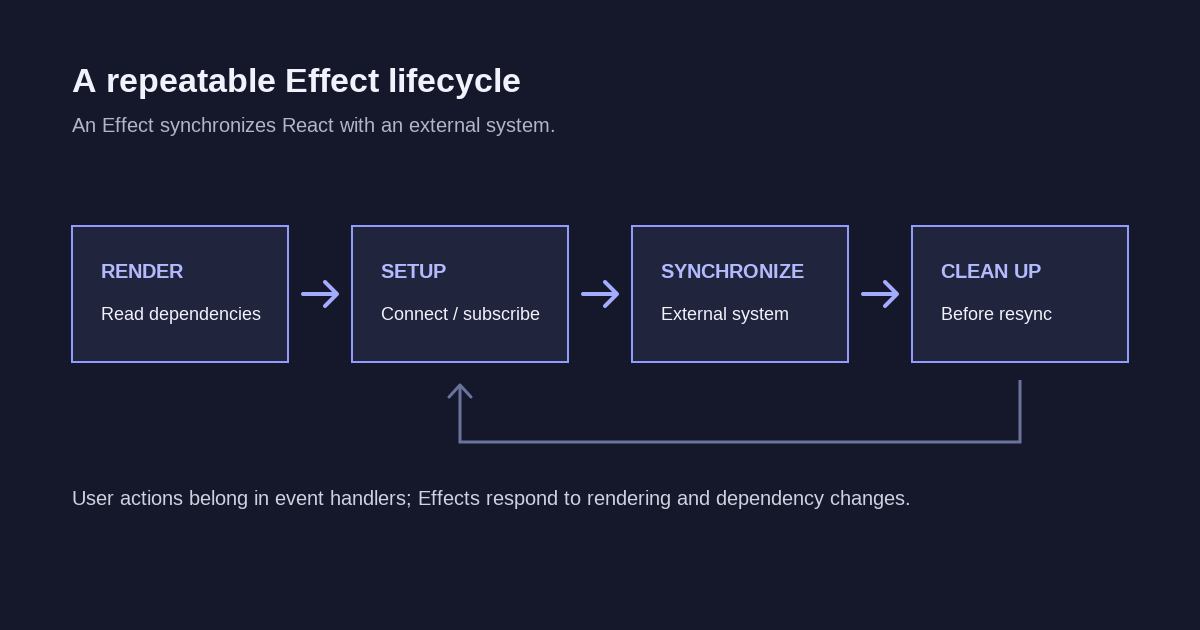
By default, an Effect without a dependency array runs after every commit. With a dependency array, React compares each dependency with its previous value. If an Effect sets state that changes one of its dependencies, it can schedule itself again. Objects and functions created during render can also have a new identity each render even when their contents appear unchanged.
Use React DevTools and temporary logging to record which dependency changed. Avoid “fixes” that simply remove dependencies: a stale closure can make the Effect use old values and produce harder-to-find bugs.
Stabilize the right thing
Often the simplest solution is to move an object or helper inside the Effect so it is not a dependency, or to restructure the component so the Effect depends on a primitive value. Memoization can help when identity genuinely needs to remain stable, but adding useMemo or useCallback everywhere adds complexity and may conceal an unclear data flow.
Clean up subscriptions and requests
An Effect that subscribes to an event source should return cleanup that unsubscribes. A connection should be disconnected when its inputs change or the component unmounts. For network requests, prevent an outdated response from overwriting newer state; use the cancellation or ignore pattern appropriate to the API.
Development Strict Mode may run setup and cleanup an extra time to expose unsafe Effects. If that reveals duplicate external actions, make setup and cleanup correctly reversible instead of disabling Strict Mode to hide the symptom.
For requests that depend on a changing search term, a slow response for an earlier term can arrive after the latest response. Cancel the previous request with an AbortController when the API supports it, or track whether a result is still current before updating state. This is not solved by suppressing a dependency warning: the component needs an explicit policy for stale work, loading state, and errors.
When a request should stop as soon as its inputs change, an abort signal is one way to clean it up:
useEffect(() => {
  const controller = new AbortController();

  async function loadResults() {
    const response = await fetch(`/api/search?q=${encodeURIComponent(query)}`, {
      signal: controller.signal,
    });

    if (!response.ok) {
      throw new Error(`Search failed: ${response.status}`);
    }

    setResults(await response.json());
  }

  loadResults().catch((error) => {
    if (error.name !== "AbortError") {
      setError(error);
    }
  });

  return () => controller.abort();
}, [query]);
This is a small pattern, not a complete data-fetching layer. Production code should model loading and error states, validate the response shape, and consider how retries and caching fit the app. The cleanup prevents an obsolete request from continuing where the platform supports cancellation; the response.ok check ensures an HTTP error does not silently look like valid search data.
A short debugging checklist
When an Effect loops, write down its sequence: render, dependency values, Effect setup, state update, next render. The dependency that changes after the state update is often the key. If an object is recreated during each render, either construct it inside the Effect or depend on the specific primitive values the external system needs. If work only needs to happen after a click, put it in the event handler instead.
- Identify the external system this Effect synchronizes with.
- Check whether derived values or user-triggered work can move out of the Effect.
- Record which dependency changed between executions.
- Ensure setup has matching cleanup where required.
- Retest dependency changes, unmounting, and development Strict Mode.
React’s guide to synchronizing with Effects explains when Effects are appropriate and how to reason about dependencies. The goal is predictable synchronization, not the fewest possible Effect executions at any cost.
After the fix, test mounting, changing each relevant dependency, unmounting during pending work, and React Strict Mode in development. Verify that only the intended connection or listener remains active and that stale responses cannot replace fresh state. Keep dependency linting enabled; if its suggested dependency creates a loop, simplify the component or move calculations rather than hiding the warning.
For a WebSocket or event subscription, the same principle applies without a fetch request: setup creates the connection or listener, and cleanup closes or unregisters that exact resource. Avoid cleanup that closes a shared connection the component does not own. If several components use a shared service, the service should generally manage the shared lifetime rather than each component independently opening and closing it.
When diagnosing a loop, separate “Effect ran” from “Effect did useful work.” A stable dependency may still trigger a deliberate synchronization; repeated setup may be correct if the external value changed. Log the values and the reason for the update during a focused debug session, then remove noisy logging. Measure network requests and active subscriptions as well as render counts: fewer renders are not always the goal if the external system is now stale.
When you review a proposed fix, check four outcomes separately: whether the render loop stopped, whether the external system still receives current values, whether obsolete work is cleaned up, and whether errors reach a visible or reportable state. A missing request can look like a performance win until the user sees stale results. A subscription that remains after unmount can leak resources or trigger updates after the owning view is gone.
It also helps to distinguish re-rendering from re-running an Effect. A component can render for many reasons while its dependencies remain unchanged, so the Effect does not necessarily run each time. Conversely, a newly created object dependency can cause an Effect to re-run even when its contents look identical. Inspect the dependency identities rather than inferring Effect behavior from a component render counter alone.
If the repeated work involves a scheduled WordPress callback rather than a React component, the problem is a different kind of lifecycle. The WP-Cron and automation guide explains duplicate scheduling guards, idempotent work, and cleanup for those jobs.
For a useful debugging pass, log the dependency values immediately before the Effect and compare them between runs. If an object is different by identity, inspect where it is created; if a primitive changes unexpectedly, trace the state update that changed it. Avoid keeping a duplicate “derived” state in sync with another state variable: calculate it during rendering where possible. This reduces both the number of dependencies and the number of opportunities for an update cycle.
Effects and event handlers also have different jobs. A request caused by opening a screen may be part of synchronizing the screen with a server; a purchase request caused by pressing “Buy” belongs in that event handler. React's official guide to synchronizing with Effects explains the distinction and why setup must be safe to repeat. For a related server/client rendering issue, see the hydration mismatch checklist and the JavaScript rendering and SEO guide.
If an Effect still appears to repeat after simplifying dependencies, inspect what the Effect changes outside React. A state update may be expected to trigger another render without changing the Effect's inputs. A subscription callback may also update a dependency each time the connection reports, creating a genuine feedback cycle. Trace the update path from callback to state to dependency, then decide whether the external value needs to be stored, derived, or filtered before it updates the view.
Test the repaired behavior under realistic timing. Change a search query quickly so responses arrive out of order, unmount the component while a request is pending, and mount it under development Strict Mode. Confirm that the newest result wins, cleanup occurs, and errors are visible. If the component owns a subscription, verify that only one active listener remains after remounting. These checks catch stale data and resource leaks that a static render test will miss.
React Effect questions
Why does an Effect run twice in development?
React Strict Mode can perform an extra setup-and-cleanup cycle in development to reveal Effects that are not safe to repeat. Make cleanup correctly reverse setup; do not disable the check just to hide duplicate behavior.
Can I remove a dependency to stop a loop?
Not safely as a default fix. The Effect may then use a stale value. Restructure the Effect or component so it depends on the values it truly needs, and keep the dependency lint rule enabled.
Should derived state be synchronized in an Effect?
Usually no. If a value can be calculated from current props and state during render, calculate it there instead of storing a second copy that must be kept synchronized.
When should an API request be in an Effect?
When the request synchronizes the rendered view with external data as its dependencies change. If it happens only because a user pressed a particular button, initiate it from that event handler instead.